Offline retrieval-augmented generation (RAG)
GitHub Copilot was my first experience with generative artificial intelligence (AI). I was impressed by its ability to make code suggestions and to generate unit tests. Translation between code comments and code was pretty seamless even the technology was based on ChatGPT-3.5 in 2022.
No matter it is GitHub Copilot or Chat GPT from OpenAI, it is available as a service which runs mostly as a black box to an end user. Although there were free tokens for anyone who wants to try it out, for more advanced usages like API calls to the service, a not insignificant amount of money would be charged. So I was not very interested in learning how does it work other than just learning enough to use it in my code editor for my $10 GitHub Copilot subscription.
Fast forward to early 2024, when I was messing with one of the charm.sh tools named mods, I realised that there are options other than OpenAI offerings and the thing is named Ollama. Ollama allows users to run models locally and it has Docker support as well. I was intrigued by the idea of running a model locally and tried to run it on my laptop using Docker. Little that I know, at the time, that running a Docker image on Mac does not have GPU support and Ollama was running on CPU. Thus, even a small model like llama2:7b was super slow to spit out a response. Luckily, it did not take long for me to realise that I need to run it on bare metal on Mac to utilise GPU. I was truely amazed by the capabilities of the models that can be run locally on my machine.
Tools like mods works by talking to API of services like OpenAI. Similarly, Ollama has its own API initially but it later extended its API to add support for OpenAI compatibility. The API makes tools can easily talk to the models via the API. Ollama is written in Go and uses gin to build the API.
As a software engineer, prompting the models via command line (or via a GUI like enchanted) is definitely not enough for my appetite. Naturally, I started to think of building a semi-useful toy application and my idea is to build a question and answer CLI tool where it answers questions based on the markdown notes that I have locally on my machine.
To demonstrate the idea, here is one of the questions that I asked.
$ rag ask \
    -m llama3.1:8b \
    -n notes \
    -q "What is the best way to conduct an interview?"
And the response was
Based on the provided documentation, the best way to conduct an interview
involves a general approach that includes giving people a real problem to solve,
regardless of the medium of the exercise. This allows you to get a better sense
for how their brain works.

Here are some specific steps and tips mentioned in the documentation:

1. **Give people a real problem**: Provide candidates with a genuine challenge
   to tackle, which can help assess their thought process and problem-solving
skills.
2. **Use whiteboarding**: Whiteboarding can be useful for sketching out system
   designs or explaining thinking on a problem. It's essential to give people
   a chance to express themselves in the medium they're most comfortable with.
3. **Ask open-ended questions**: Try to ask questions that encourage candidates
   to share their thought process and approach, rather than just seeking
   a specific answer.
4. **Look for passion and curiosity**: Pay attention to whether candidates show
   genuine interest in the role, company, technology, and products. A lack of
   curiosity or defensiveness can be red flags.
5. **Provide feedback**: After the interview, don't hesitate to give feedback on
   what candidates did well. This can help them understand their strengths and
   weaknesses.

Additionally, the documentation suggests that you should:

* Reassure candidates that you're interested in how they approach problems, not
  just the answers.
* Ask questions that allow candidates to showcase themselves.
* Encourage candidates to explain complex concepts in simple terms.
* Look for passion and enthusiasm in a candidate's work.
* Use easy programming questions to filter out unsuitable candidates (e.g.,
  "Write a function that determines if a string starts with an upper-case letter
  A-Z").
* Leave time at the end of the interview to sell the company and job to the
  candidate.

By following these guidelines, you can conduct a more effective and informative
interview.
The response was based on this markdown and the model summarised the relevant parts of the markdown to answer the question pretty well.
Background
One of the ways to include customised data in a generated response is to pre-train the model with the data. Although this approach provides the best performace in terms of quality of response, it requires a lot of resources and time to train a new customised model. Another approach is to use retrieval augmented generation (RAG) where generation involves a step of retriving relevant information from a database of customised data and incorporating it into the generated response. This approach is more efficient in terms of resources and time as the model does not need to be re-trained with customised data which it can be changed frequently.
Preparing database of customised data
The steps required to load reference markdown files and to store in a database are outlined in this diagram.
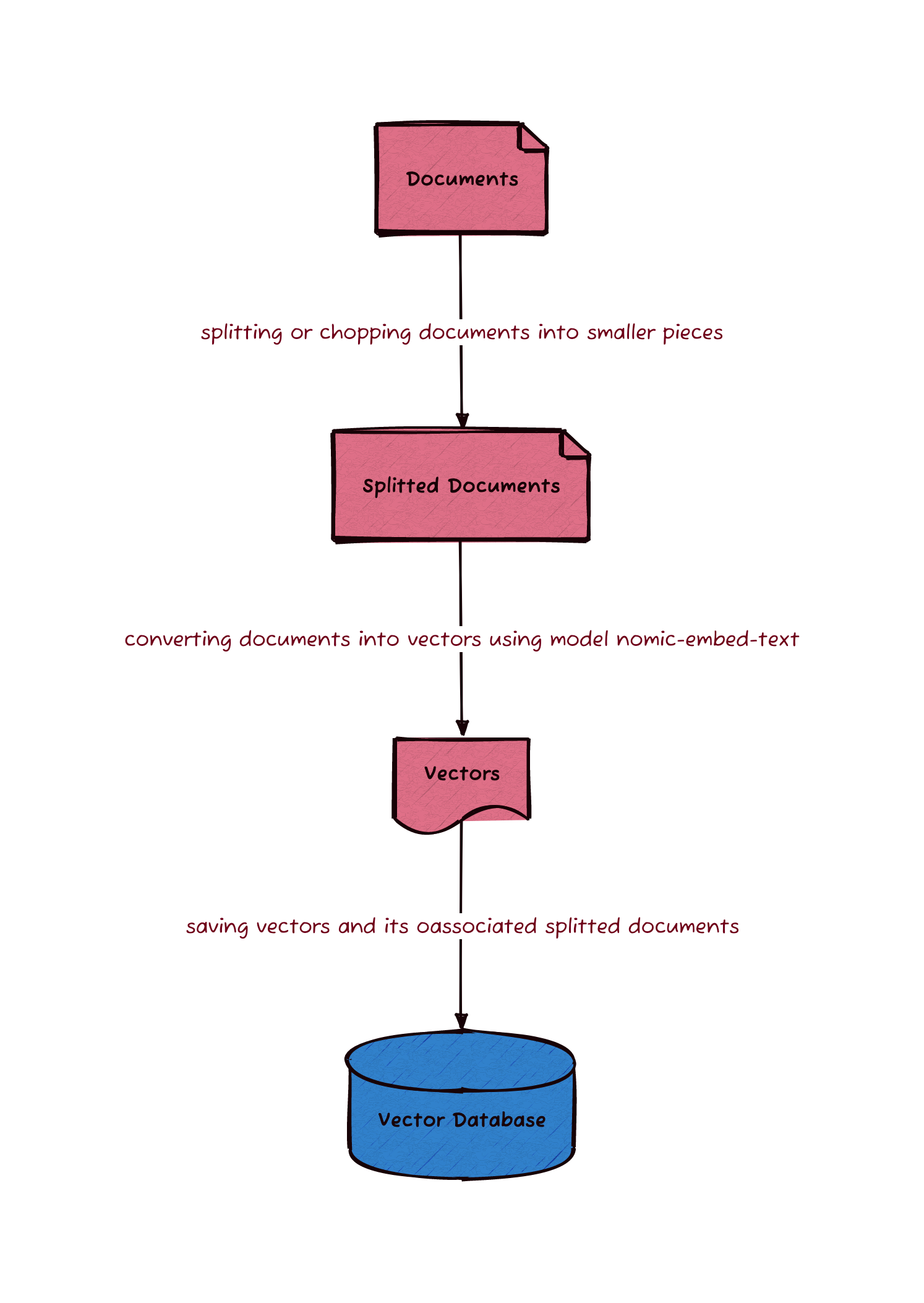
To prepare the database of customised data, we load markdown files in a specified directory into memory. Along with the text of each markdown file, we also retrieve the metadata of the markdown file such as the filename. The metadata can be stored in the database the later steps.
The texts cannot be be directly stored into a database. One of the reasons is
that the text is either too large to be used as embedding of a LLM or it
contains too many topics which affects the quality of the response. To address
this issue, text chunking is done before storing the text into the database.
There are many text chunking techniques including the use of NLP to split text
based on semantic meaning. However, I am no NLP expert and so I will use the
simplest technique where text will be splitted into fixed-length chunks (1500
characters) and there will be a bit of overlap (300 characters) between chunks
to avoid splitting up an important sentence. Each model has a limit of number of
tokens to be used in an embedding. For example, model llama3.1 has a limit
of 4096 token and model gemma2 has a limit of 3584 token. Therefore
parameters used in chunking depends on the models to be used.
After splitting the text into chunks, a model is used to convert each chunk into a vector. The model used in this conversion is nomic-embed-text. There are many models can be used such conversion and it can be found on this list on Ollama. The converted vectors along with its associated text and metadata are stored in a database. The database of choice is Chroma and it is a database for storing embedding vectors. Chroma stores text and metadata in a SQLite database and the associated vectors in its own indexed data structure.
The above steps can be summarised as the following code.
documents := retrieveDocuments(documentDirectoryPath)
splitter := createMarkdownSplitter(splitterChunkSize, splitterChunkOverlap)
splittedDocuments := splitDocuments(splitter, documents)
embedClient := ollama.New(
  ollama.WithModel(embeddingModelName),
)
embedder := embeddings.NewEmbedder(embedClient)
store := chroma.New(
  chroma.WithChromaURL(databaseURL),
  chroma.WithNameSpace(databaseName),
  chroma.WithEmbedder(embedder),
  chroma.WithDistanceFunction(types.COSINE),
)
for i := 0; i < len(splittedDocuments); i += VECTOR_STORE_BATCH_SIZE {
  end := i + VECTOR_STORE_BATCH_SIZE
  if end > len(splittedDocuments) {
    end = len(splittedDocuments)
  }
  store.AddDocuments(ctx, splittedDocuments[i:end])
}
where
ollamarefers to packagegithub.com/tmc/langchaingo/llms/ollama,embeddingsrefers to packagegithub.com/tmc/langchaingo/embeddings, andchromarefers to packagegithub.com/tmc/langchaingo/chroma.
An example of invoking the CLI application is as follows.
$ rag load -f ~/notes/ -n notes
The above command loads markdown files in the directory ~/notes/ into Chroma
database with collection name as notes.
Generate answers to questions
The steps taken to generate answers to questions are outlined in this diagram.
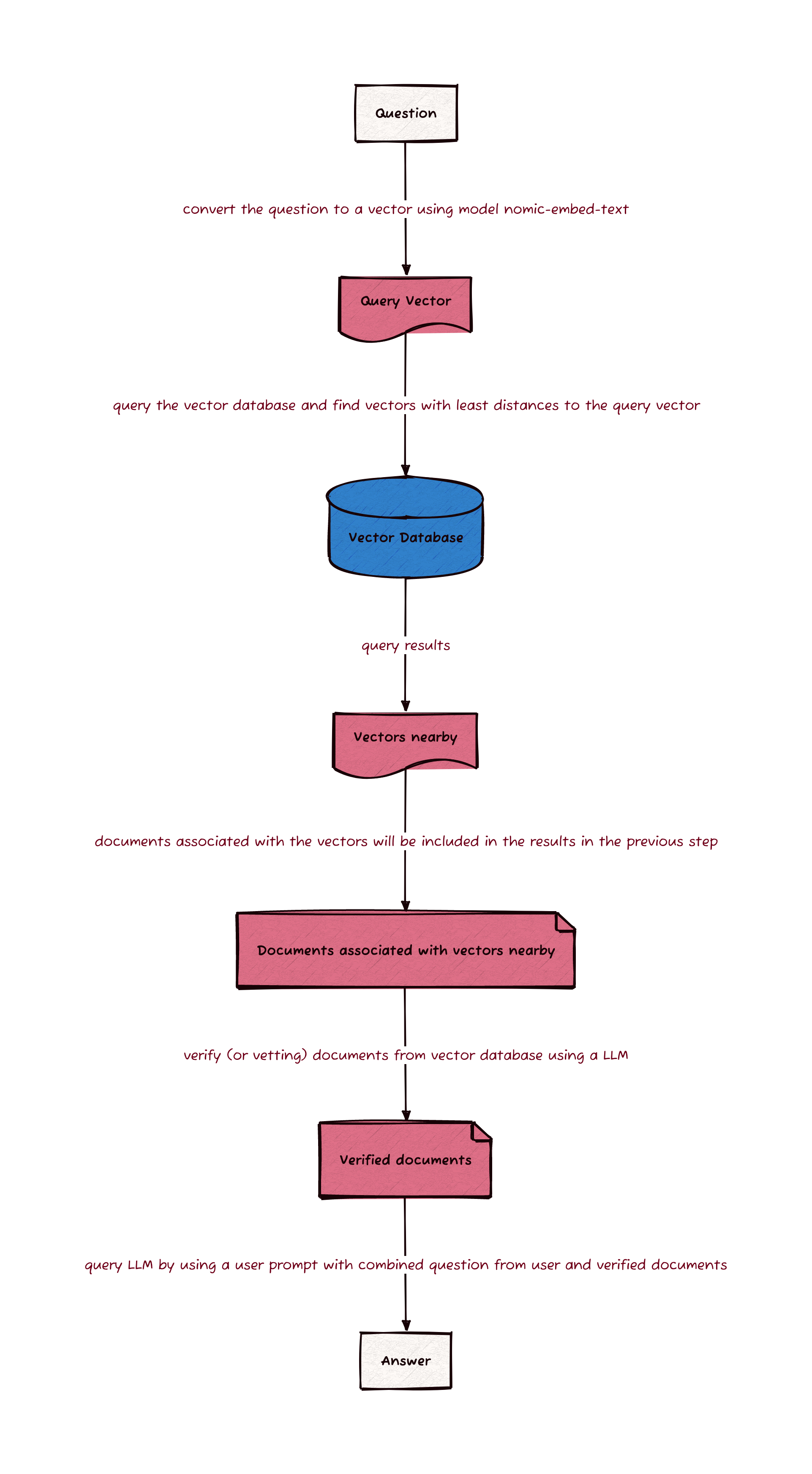
The first step is to retrieve relevant documents from the vector database Chroma previously created. The retrieval is done by using model nomic-embed-text to convert the question into a vector and the vector is then used by Chroma to find the closest vectors in the database. Chroma will then return the associated text and metadata of the closest vectors.
To ensure the quality of the response, the retrieved documents are graded by
a model to filter out irrelevant retrievals. The model used in this grading is
the same model which will be used to generate an answer. The grading is done
by asking the grader to give a binary score of yes or no to indicate whether
the document is relevant to the question.
The following system prompt is used in the grader to specify the role we want the model (grader) to play.
You are a grader assessing relevance of a retrieved document to a user question.
If the document contains keywords related to the user question,
grade it as relevant. It does not need to be a stringent test.
The goal is to filter out erroneous retrievals.
Give a binary score 'yes' or 'no' score to indicate whether the document is
relevant to the question.
Provide the binary score as a JSON with a single key 'score' and no premable or
explanation.
User’s question and the retrieved document are then passed to the model via user prompt. The model will then generate a response in the form of a JSON which contains the binary score and can be parsed in the code.
After the grading, the remaining relevant documents are then used to generate the response for an answer to the question from user. The system prompt used in this step to specify the role of the model is as follows.
You are an assistant for question-answering tasks.
Use the following pieces of retrieved documentation to answer the question.
Please write in full sentences with correct spelling and punctuation. If it
makes sense, use lists.
If the documentation does not contain the answer, just respond that you are
unable to find an answer.
Explain the reasoning as well.
One of the major problems with generative AI is
hallucination.
To reduce the chance of this problem, statement If the documentation does not contain the answer, just respond that you are unable to find an answer. is used
in the system prompt to let the model knows that it should not be too “creative”
when there is no relevant context to answer a question. Thus, with the above
system prompt set, the model will answer “I don’t know” if there is no relevant
documents retrieved from Chroma database.
The following code summarises the above process of generating an answer to a user’s question.
embedder := getEmbedder(embeddingModelName)
store := chroma.New(
  chroma.WithChromaURL(databaseURL),
  chroma.WithNameSpace(databaseName),
  chroma.WithEmbedder(embedder),
)
retriever := vectorstores.ToRetriever(
  store,
  NUM_DOCUMENTS_TO_BE_USED,
  vectorstores.WithScoreThreshold(DEFAULT_SEARCH_SCORE_THRESHOLD),
)

documents := retriever.GetRelevantDocuments(ctx, askOpts.question)
if len(documents) == 0 {
  fmt.Println("No reference documents found")
  return nil
}

llm := ollama.New(
  ollama.WithModel(modelName),
)
relevantDocuments := []schema.Document{}
for _, doc := range documents {
  graderSystemPrompt := `
    You are a grader assessing relevance of a retrieved document to a user question.
    If the document contains keywords related to the user question,
    grade it as relevant. It does not need to be a stringent test.
    The goal is to filter out erroneous retrievals.
    Give a binary score 'yes' or 'no' score to indicate whether the document is relevant to the question.
    Provide the binary score as a JSON with a single key 'score' and no premable or explanation.`
  graderUserPrompt := fmt.Sprintf("Here is the retrieved document: %s \n\nHere is the user question: %s", doc.PageContent, question)
  gradingResponse, err := llm.GenerateContent(
    ctx,
    []llms.MessageContent{
      {
        Role:  llms.ChatMessageTypeSystem,
        Parts: []llms.ContentPart{llms.TextContent{Text: graderSystemPrompt}},
      },
      {
        Role:  llms.ChatMessageTypeHuman,
        Parts: []llms.ContentPart{llms.TextContent{Text: graderUserPrompt}},
      },
    },
  )
  if err != nil {
    return fmt.Errorf("unable to grade reference document: %w", err)
  }
  var graderResponse GraderResponse
  errParse := jsonhelper.ParseJSONString(gradingResponse.Choices[0].Content, &graderResponse)
  if errParse != nil {
    return fmt.Errorf("unable to parse grading response: %w", errParse)
  }
  if graderResponse.Score == "yes" {
    relevantDocuments = append(relevantDocuments, doc)
  }
}

if len(relevantDocuments) == 0 {
  fmt.Println("No relevant documents found")
  return nil
}

fmt.Printf("About to answer your question using %d relevant document sections...\n\n\n", len(relevantDocuments))

systemPrompt := `
  You are an assistant for question-answering tasks.
  Use the following pieces of retrieved documentation to answer the question.
  Please write in full sentences with correct spelling and punctuation. if it makes sense use lists.
  If the documentation doen't contain the answer, just respond that you are unable to find an answer.
    Explain the reasoning as well.`
relevantTexts := make([]string, 0, len(relevantDocuments))
for _, doc := range relevantDocuments {
  relevantTexts = append(relevantTexts, doc.PageContent)
}
userPrompt := fmt.Sprintf("Documentation: %s \n\nQuestion: %s \n\nAnswer: ", strings.Join(relevantTexts, " ; "), question)
llm.GenerateContent(
  ctx,
  []llms.MessageContent{
    {
      Role: llms.ChatMessageTypeSystem,
      Parts: []llms.ContentPart{llms.TextContent{Text: systemPrompt}},
    },
    {
      Role: llms.ChatMessageTypeHuman,
      Parts: []llms.ContentPart{llms.TextContent{Text: userPrompt}},
    },
  },
  llms.WithStreamingFunc(func(_ context.Context, chunk []byte) error {
    fmt.Print(string(chunk))
    return nil
  }),
)
where
embeddingModelNameis set asnomic-embed-text,vectorstoresrefers to packagegithub.com/tmc/langchaingo/embeddingsollamarefers to packagegithub.com/tmc/langchaingo/llms/ollamallmsrefers to packagegithub.com/tmc/langchaingo/llms
The command built using the code above can be demonstrated by the following.
$ rag ask \
    -m llama3.1:8b \
    -n notes \
    -q "What is the best way to conduct an interview?"
where llama3.1:8b is the model used to generate an answer via Ollama API and
notes is the collection of documents stored in Chroma database.
The End
As you can see, this CLI application allows me to ask questions against my latest version of notes without training any new models and using models running offline on my laptop. When there is a new version of notes, all I need to do is to rebuild the Chroma vector database which takes about a minute for 200 markdown files on a laptop.
This is only my first exploration into generative AI. Things like agents can be build using langchain. Hopefully, I will be able to spend time and build more stuff in the near future. I will share my journey in my future posts.
Happy coding!
Code of the CLI can be found on alexhokl/rag.
