Creating ASP.NET controls with jQuery and MS AJAX (for MS AJAX dummies)
After reading an interesting tutorial from Janko about How to create Skype-like buttons using jQuery, I decided to wrap his javascript code, style sheets and HTML markups into an ASP.NET AJAX control. Wrapping them into a single control allows other page developers to use the control without worrying about the control’s details and keep focusing on the page’s overall functionality and layout. It is actually a simple task, but it can be very difficult for starters. I’ll do it in as much detail as possible and hope everyone will be able to follow the steps involved and know why things go this way.
Since I already have materials working without ASP.NET, the focus here is the techniques (or steps) required to wrap the materials in an ASP.NET AJAX control.
Okay. HTML markups first.
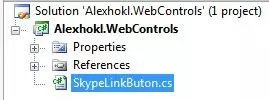
ASP.NET page developers usually consume assemblies containing HTML or web controls. Thus, I’m going to create a control living inside a normal .NET class library and named it as Alexhokl.WebControls. I will add a new class named SkypeLinkButton as well. The folder structure should look something like this after creation and addition.
Since the markup we want to render looks something like this:
The most convenient choice of class to inherit is ASP.NET LinkButton. As LinkButton is in namespace System.Web.UI.WebControls, I’ll have to add reference to System.Web.DLL and System.Web.Extensions.DLL. The code now should look something like this:
using System;
using System.Collections.Generic;
using System.Linq;
using System.Text;

// added
using System.Web;
using System.Web.UI;
using System.Web.UI.HtmlControls;
using System.Web.UI.WebControls;

namespace Alexhokl.WebControls
{
  public class SkypeLinkButon : LinkButton
  {
  }
}
The button we want contains an image and a piece of text. To allow using custom image and text, we will use the inherited Text property and add an ImageUrl property. LinkButton is essentially responsible for rendering the anchor tag (<a>). To render the image tag and the text inside the anchor tag, we will override the CreateChildControls method. This method is invoked whenever the server needs to construct the control and maybe called more than once. Thus, besides adding the necessary controls to it, some housekeeping work is necessary.
public class SkypeLinkButon : LinkButton
{
  protected override void CreateChildControls()
  {
    this.Controls.Clear();
    base.CreateChildControls();

    HtmlImage img = new HtmlImage();
    img.Src = this.ImageUrl;
    img.Style[HtmlTextWriterStyle.Top] = "-4px";

    Literal literal = new Literal();
    literal.Text = this.Text;

    this.Controls.Add(img);
    this.Controls.Add(literal);

    this.ChildControlsCreated = true;
  }

  [UrlProperty]
  public string ImageUrl { get; set; }
}
The child controls are first cleared and the base method is called to create the necessary materials. To implement the image tag, we use HtmlImage; to implement the text, we use a literal control. We then add both controls to the control hierarchy by calling the Add method. Property ChildControlsCreated is set to true to tell the server that all the child controls are created successfully. This allows the server to skip another call to this method in the life cycle. (As you may notice in other implementations, EnsureChildControls are usually called everytime a control’s property is modified.)
Where is AJAX?
So far what we have done is just about ordinary techniques to create an ASP.NET control. The code above is good enough to render all the necessary HTML markups. What following up is embedding javascript and style sheet files in assembly. It should be reminded that embedding is not a must. But doing so will give us much convenience during deployment.
AJAX now? Not yet. Embed files first.
Now we will create two more files: one is SkypeLinkButton.css and SkypeLinkButtonBehavior.js. The file structure should look something like this after creation:
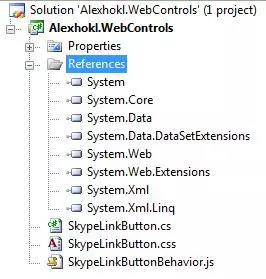
To embed the newly added files, right click on the file and select “Properties”. Changing the “Build Action” property from “Copy” to “Embedded resource” will allow the file to be embedded during compilation.
Done? Not yet. We need to enable the embedded files to allow the file to be served on web server. To do this, we use WebResource attribute.
using System;
using System.Collections.Generic;
using System.Linq;
using System.Text;

// added
using System.Web;
using System.Web.UI;
using System.Web.UI.HtmlControls;
using System.Web.UI.WebControls;

[assembly: WebResource("Alexhokl.WebControls.SkypeLinkButtonBehavior.js", "text/javascript", PerformSubstitution = true)]
[assembly: WebResource("Alexhokl.WebControls.SkypeLinkButton.css", "text/css", PerformSubstitution = true)]

namespace Alexhokl.WebControls
{
  public class SkypeLinkButon : LinkButton
  {
    protected override void CreateChildControls()
As you may notice, there are two arguments in the WebResource attribute. The second one is the familiar “content type” value. The first argument is the “web resource name” and is perhaps the trickiest part in embedding resource files. The argument is not defined arbitrarily and, if it is incorrectly defined, the web server will not be able to serve the file. The name is based on two parts: one is name of assembly and relative path of the file inside the assembly. Thus, the name of javascript file here can be seen as Alexhokl.WebControls. + SkypeLinkButtonBehavior.js. If the javascript file is placed inside folder named “Folder”, the web resource name will be Alexhokl.WebControls.Folder.SkypeLinkButtonBehavior.js.
MS AJAX starts here!
Now the files are able to be served on web server. Our next task is to request the files when page containing our control is loaded. What we want to do is:
- Add script tags to load the javascript files
- Add link tags to load the style sheet files
- Add some javascript code to the bottom of the page to initialise the control on client side
From Janko’s demo, you can observe that “jumping” behaviour is added to the normal anchor link. Here, we want to create an object to encapsulate all the client-side behaviour. Fortunately, the MS AJAX framework provides us a very convenient way to accomplish this.
First, we need to make our SkypeLinkButton class implementing the IScriptControl interface. The interface declared methods that help mapping our javascript (client-side object) to our client-side element (which is the anchor element this time) and help registering a reference to the embedded javascript file. We will implement the two method like below.
public IEnumerable<Scriptdescriptor> GetScriptDescriptors()
{
  yield return new ScriptBehaviorDescriptor("Alexhokl.WebControls.SkypeLinkButtonBehavior", this.ClientID);
}

public IEnumerable<Scriptreference> GetScriptReferences()
{
  yield return new ScriptReference(this.Page.ClientScript.GetWebResourceUrl(this.GetType(), "Alexhokl.WebControls.SkypeLinkButtonBehavior.js"));
}
(yield keyword helps setting up a state machine to help setting up an enumerable object. You can choose return a list. Using yield to me is just syntactic sugar, although there is a bit of performance gain.) The above are just methods to help you setting up our javascript object, not creating them yet. We need to override life-cycle method’s OnPreRender and Render to create (should be “to render scripts to create”) the javascript object. Here is how we do it.
protected override void OnPreRender(EventArgs e)
{
  if (string.IsNullOrEmpty(this.ImageUrl))
    throw new Exception("Property ImageUrl cannot be null or empty.");

  this.scriptManager = ScriptManager.GetCurrent(this.Page);
  if (this.scriptManager == null)
    throw new HttpException("A ScriptManager control must exist on the current page.");

  this.scriptManager.RegisterScriptControl(this);

  // load jQuery from google CDN
  ClientScriptManager csm = this.Page.ClientScript;
  string protocol = HttpContext.Current.Request.IsSecureConnection ? "https" : "http";
  string jQueryScriptId = "jQueryScriptId";
  if (!csm.IsClientScriptIncludeRegistered(jQueryScriptId))
    csm.RegisterClientScriptInclude(jQueryScriptId,
      string.Format("{0}://ajax.googleapis.com/ajax/libs/jquery/1.3.2/jquery.min.js", protocol));

  // load the embedded style sheet
  string cssUrl = this.Page.ClientScript.GetWebResourceUrl(this.GetType(), "Alexhokl.WebControls.SkypeLinkButton.css");
  HtmlHead head = this.Page.Header;
  if (head != null)
  {
    // need to make sure we only load the css 1 time
    if (head.FindControl(CreateValidID(cssUrl)) == null)
    {
      HtmlLink cssLink = new HtmlLink();
      cssLink.Href = cssUrl;
      cssLink.Attributes.Add("rel", "stylesheet");
      cssLink.Attributes.Add("type", "text/css");
      head.Controls.Add(cssLink);
    }
  }

  // set to use the css class we define in our embbed style sheet
  this.CssClass = string.Format("{0} skypebutton", this.CssClass);

  base.OnPreRender(e);
}

protected override void Render(HtmlTextWriter writer)
{
  this.scriptManager.RegisterScriptDescriptors(this);

  base.Render(writer);
}

private static string CreateValidID(string cssHref)
{
  string strBadCharacters = @" ./-\";
  foreach (var c in strBadCharacters)
    cssHref = cssHref.Replace(c, '_');
  return cssHref;
}
At the beginning of OnPreRender, some checkings are done to make sure we could render the control correctly. The scriptManager is a control required on a page using MS AJAX. However each page can only associated with one script manager. In line 10 of the above listing, our control is register to the page’s script manager so that the manager will be able to help creating our client-side behavior object. The remaining lines of code are to add the script tag to load the jQuery library from Google CDN and add the link tag to load the embedded style sheet file. One thing to notice is remember to call the overridden base method to make sure all the necessary things are prepared for rendering.
In Render method, we need to register script descriptors of our control to the script manager. What script descriptor does is to transfer server side properties or data to client side and what information is transferred is stated in the IScriptControl.GetScriptDescriptors method. For simplicity, I didn’t pass any data inside the method. But you can do so by creating a ScriptBehaviorDescriptor object and calling its AddProperty or AddElementProperty method to pass the required data, and then return this descriptor object (corresponding client-side javascript code has to be written to “collect” the data).
What is on client side?
You may notice the string Alexhokl.WebControls.SkypeLinkButtonBehavior in the IScriptControl.GetSriptDescriptors method. The string is actually the name of client side object we are going to implement. Okay, hold your breath. Here is the code skeleton.
///<reference name="MicrosoftAjax.js"/>

Type.registerNamespace('Alexhokl.WebControls');

Alexhokl.UI.WebControls.SkypeLinkButtonBehavior = function(element) {

  Alexhokl.WebControls.SkypeLinkButtonBehavior.initializeBase(this, [element]);

}

Alexhokl.WebControls.SkypeLinkButtonBehavior.prototype = {
  // lifecycle method
  initialize: function() {
    Alexhokl.WebControls.SkypeLinkButtonBehavior.callBaseMethod(this, 'initialize');

  },

  // lifecycle method
  dispose: function() {
    Alexhokl.WebControls.SkypeLinkButtonBehavior.callBaseMethod(this, 'dispose');
  }
}

Alexhokl.WebControls.SkypeLinkButtonBehavior.registerClass('Alexhokl.WebControls.SkypeLinkButtonBehavior', Sys.UI.Behavior);

if (typeof (Sys) !== 'undefined') Sys.Application.notifyScriptLoaded();
This is not that difficult to understand… believe me… but need a bit of time. The first line of content helps Visual Studio to locate the MS AJAX javascript library for the sake of Intellisense.(Yes, there is Intellisense) Many things here is trying the resemble things in .NET OOP model. The first function is basically a place for declaring “private variables”. For example, we may have this._myVariable = null; to declare a private variable _myVariable. The initialize method resembles the “constructor” of a class. Similarly, dispose method responsible for destructor’s actions. From Janko’s javascript code, all we need to do is to add code to the initialize method. After the addition, the whole thing should look like this.
///<reference name="MicrosoftAjax.js"/>

Type.registerNamespace('Alexhokl.WebControls');

Alexhokl.WebControls.SkypeLinkButtonBehavior = function(element) {

  Alexhokl.WebControls.SkypeLinkButtonBehavior.initializeBase(this, [element]);

}

SHG.SHINE3.Application.Web.UI.WebControls.SkypeLinkButtonBehavior.prototype = {
  // lifecycle method
  initialize: function() {
    Alexhokl.WebControls.SkypeLinkButtonBehavior.callBaseMethod(this, 'initialize');

    var element = this.get_element();
    $(element).hover(function() {
       $(this)'#' + $(this).attr('id') + ' img')
       // first jump
       .animate({ top: "-10px" }, 200).animate({ top: "-4px" }, 200)
       // second jump
       .animate({ top: "-7px" }, 100).animate({ top: "-4px" }, 100)
       // the last jump
       .animate({ top: "-6px" }, 100).animate({ top: "-4px" }, 100);
   });
},

  // lifecycle method
  dispose: function() {
    Alexhokl.WebControls.SkypeLinkButtonBehavior.callBaseMethod(this, 'dispose');
  }
}

Alexhokl.WebControls.SkypeLinkButtonBehavior.registerClass('Alexhokl.WebControls.SkypeLinkButtonBehavior', Sys.UI.Behavior);

if (typeof (Sys) !== 'undefined') Sys.Application.notifyScriptLoaded();
Added code is almost same as Janko’s code. Except we are using this.get_element() function to get the reference of the anchor element and then wrap it by jQuery’s $(). The function is available from MS AJAX framework. The function can return the anchor element because we have associated the client-side behavior object with the element in IScriptControl.GetScriptDescriptors method. To find the image for animation, children method is used.
Style sheet now…
Can we just copy Janko’s styles to our style sheet? Almost… Have a check on his styles you will find a background image will be loaded. Of course, you can code the URL and place the image accordingly. For the ease of deployment, we can embed the background image to the assembly as well. To do this, we first add the image to our project. Then, we select its “Build Action” property to “Embedded resource”. Next, we add WebResource attribute to again like below.
[assembly: WebResource("Alexhokl.WebControls.SkypeLinkButtonBehavior.js", "text/javascript", PerformSubstitution = true)]
[assembly: WebResource("Alexhokl.WebControls.SkypeLinkButton.css", "text/css", PerformSubstitution = true)]
[assembly: WebResource("Alexhokl.WebControls.bkg.png", "image/png")]
Here is our style sheet content.
.skypebutton {
  padding: 4px 10px 3px 25px;
  border: solid 1px #8AB134;
  position: relative;
  cursor: pointer;
  display: inline-block;
  background-image: url(<%= WebResource("Alexhokl.WebControls.bkg.png") %>);
  background-repeat: repeat-x;
  font-size: 11px;
  height: 16px;
  text-decoration: none;
  color: #40740D;
  -moz-border-radius-bottomleft: 5px;
  -moz-border-radius-bottomright: 5px;
  -moz-border-radius-topleft: 5px;
  -moz-border-radius-topright: 5px;
}
.skypebutton img {
  position: absolute;
  top: -4px;
  left: -12px;
  border: none;
}
.skypebutton:hover {
  color: #8AB134;
  text-decoration: none;
}
The WebResource tag inside will be replaced by a correct URL when the server parses this file. However, the server will do this kind of replacement only if the PerformSubstitution property is set to true for the WebResource attribute of the style sheet file.
Finished?
Yes. You can now deploy the compile assembly (Alexhokl.WebControls.DLL) or use the assembly to do your page development.
To learn more about MS AJAX, I strongly encourage you to set up a simple web application to see what is rendered in the HTML markups. There are a few thing you may observe:
linktag insideheadtag
<link href="/WebResource.axd?d=YNaBRZ8x69XFlRxlm1R7jkGKSJLYaJ8WOtyPNxIc8I7PwXSdjS_SbOStsEQ9z3RGOFfrJJMYKZVMMuMb4HRXh4KnU8maEihGUCsmlUTOgd6GnXYbjVGceBEuvoHS6sJvjA-D6hYm3lBJFFzRKxDL_Q2&amp;t=633739554426503190" rel="stylesheet" type="text/css" />
A link requesting WebResource.axd is rendered as a result of GetWebResourceUrl method is called inside OnPreRender method on server side.
scripttags at the beginning ofbodytag
<script src='http://ajax.googleapis.com/ajax/libs/jqueryui/1.7.1/jquery-ui.min.js" type="text/javascript"></script>
<script src="/WebResource.axd?d=l53QigJd3KGiEVv-3KumAbiX189-7RprPkX3_4MKfr48x-zQ4acbiUL9qUInbHCWK4t6fBnLwHSUUUV5E62gBfH1B_kA8UWnXPpY7Eh0W6E1&amp;t=ffffffffb65abaae" type="text/javascript"></script>
These script tags are added as a result of calling RegisterClientScriptInclude and RegisterScriptControl methods in OnPreRender method on server side.
- anchor tag
<a onclick="onPayByCreditCard();" id="ctl01_mainContent_ctl00_ButtonByCreditCard" class=" skypebutton" href="javascript:__doPostBack('ctl01$mainContent$ctl00$ButtonByCreditCard','')">
<img src="/WebResource.axd?d=YNaBRZ8x69XFlRxlm1R7jkGKSJLYaJ8WOtyPNxIc8I7PwXSdjS_SbOStsEQ9z3RGOFfrJJMYKZVMMuMb4HRXh4KnU8maEihGUCsmlUTOgd7aZfH-0-s41XgMfAlQQRwRenIF4HCUQJ71zIzja2ZqQg2&t=633739554426503190" style="top:-4px;" />
Pay by credit card
</a>
The element and its child elements are render as a result of code in CreateChildControls method.
- behavior object is created by MS AJAX framework inside the script tag near the very bottom of the page (just before the
bodyend tag)
<script type="text/javascript">
//<![CDATA[
Sys.Application.initialize();
Sys.Application.add_init(function() {
$create(Alexhokl.WebControls.SkypeLinkButtonBehavior, null, null, null, $get("ctl01_mainContent_ctl00_ButtonByCreditCard"));
});
//]]>
</script>
As you may notice from the script, MS AJAX framework initialises itself first. It then creates the behaviour object and associates it with the ID of the anchor element on client side.
Summary
This post just covers the basic steps to create an ASP.NET AJAX control. There are much more you can do with the control, such as passing server-side properties (using script descriptors) and globalisation (internationalisation) of the control (using ScriptResource). All of these tools are just helping you to render the correct HTML markups on client-side. Thus, I guess the best way to learn is always checking the client-side behaviour using tools like Firebug or IE Developer.
Hope this helps… :)
